
Nginx 基础与安装
📝 笔记摘要:Nginx 基础与安装
1.版本分几支:
Nginx 开源版 —— nginx.org,免费社区版,日常够用
Nginx Plus 商业版 —— nginx.com,要企业支持和更高级的负载均衡
OpenResty —— 基于 Nginx 加了 Lua,能跑 Lua 脚本做二次开发
Tengine —— 淘宝改的版,配置更简洁,国内云厂商的底座
提示:国内 CDN 和云厂商大多基于 Tengine。装之前先看一眼发行版,别硬套官方源。
2.运行原理,master 和 worker:
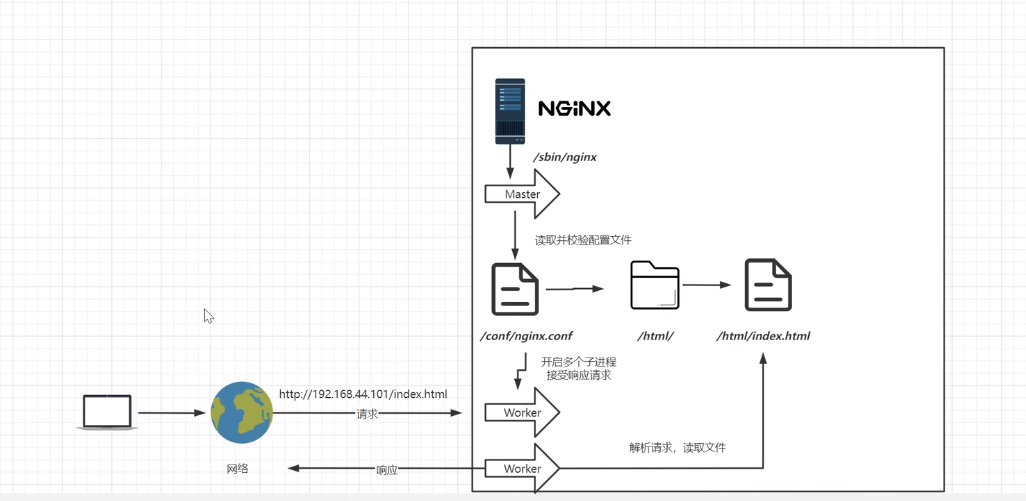
master 进程:只干两件事,读配置文件、给 worker 派活。自己不处理请求
worker 进程:真正干活的,解析请求、读文件、返回响应
worker 是进程不是线程,崩了一个不影响其他几个
提示:改配置用 reload 而不是 restart,master 不动,正在处理的请求不会断。
数 worker 数量用
ps -ef | grep nginx,对不上就是有 worker 异常退出了。
3.源码编译安装:
3.1 先装依赖,少一个都会在 configure 的时候报错:
yum install -y gcc
yum install -y pcre pcre-devel
yum install -y zlib zlib-devel
yum install -y openssl openssl-devel
3.2 四个必踩的报错,按顺序往下解:
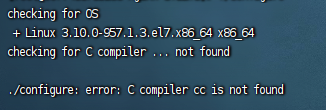
① 没有 C 编译器
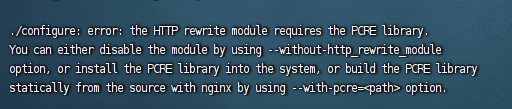
② 缺 PCRE
③ 缺 zlib

④ 缺 OpenSSL
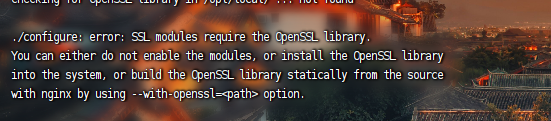
注意:这四个错都是同一个套路——报错里会直接告诉你装什么,照着
yum install完重新./configure就行,不用从头解压。
3.3 configure、编译、安装:
tar -zxvf nginx-1.22.1.tar.gz
cd nginx-1.22.1

./configure --prefix=/usr/local/nginx --with-http_ssl_module

make -j$(nproc)
make install
提示:
--with-http_ssl_module一定要写。不带它编出来的 nginx 没有 ssl 模块,后面配listen 443 ssl会直接启动失败。
4.启动和停止:

cd /usr/local/nginx/sbin

./nginx            # 启动
./nginx -s stop    # 快速停止,直接掐掉
./nginx -s quit    # 优雅关闭,等手上的请求做完再退
./nginx -s reload  # 重新加载配置
./nginx -t          # 只检查语法,不实际启动
注意:改完 conf 先
./nginx -t,语法过了再 reload。reload 遇到语法错误会静默跳过,旧配置继续跑,不检查很容易以为改生效了。
5.核心目录长这样:
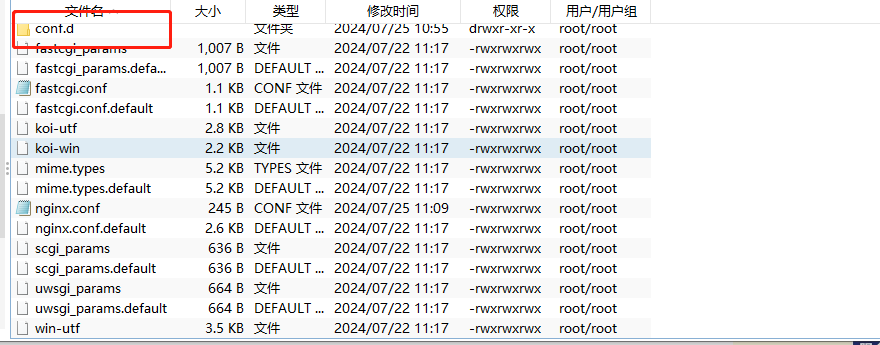
conf/ —— 配置文件都在这
html/ —— 默认站点的根目录
logs/ —— 访问日志和错误日志
sbin/ —— nginx 可执行文件
include/ —— 拆分配置的时候用
提示:conf 目录里凡是
.default结尾的都是官方自带的备份,改坏了直接复制回来。
6.include 拆分配置:
server 都堆在 nginx.conf 里,改多了容易互相踩。摘出去单独放,再用 include 引回来:
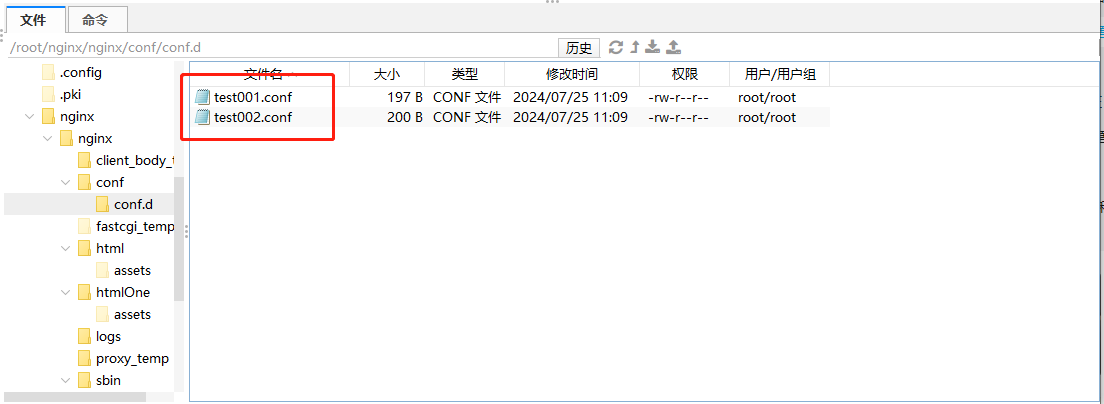
nginx.conf 只留主干:
user  root;
worker_processes  1;

events {
    worker_connections  1024;
}

http {
    include       mime.types;
    include       conf.d/*.conf;   # 这行是重点
    default_type  application/octet-stream;
    sendfile      on;
    keepalive_timeout  65;
}
conf.d/test001.conf:
server {
    listen       80;
    server_name  test001.example.com;
    location / {
        root   /root/nginx/nginx/html;
        index  index.html index.htm;
    }
}
提示:新加了 conf 文件必须 reload 才生效,且
-t要过。include的路径是相对 nginx.conf 所在目录的,写绝对路径不容易搞混。
7.多站点怎么部署:
单 IP 多端口 —— 多个 server 分别 listen 80 / listen 81,访问时带上端口
多 IP 单端口 —— 监听不同的 IP + 同一个端口,网卡要绑多个 IP,笔记里没展开
单 IP 多域名 —— 都 listen 80,靠 server_name 区分
域名这台的服务器没有默认站点:把 test001 的配置注释掉,访问 test001 不会报错,会静悄悄落到 test002 的站点上去。要给一个兜底的默认站点,加 default_server:
server {
    listen       80 default_server;
    server_name  test001.example.com;
    location / {
        root   /root/nginx/nginx/html;
        index  index.html index.htm;
    }
}
8.日志:
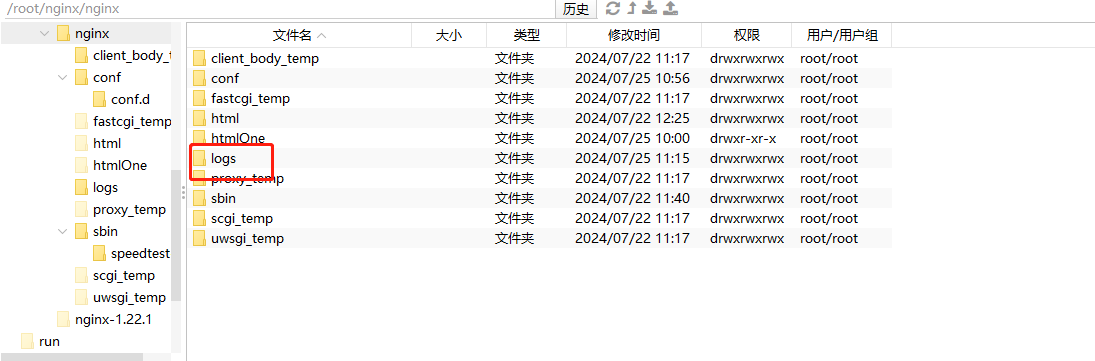
默认的 access.log 记访问 IP 和时间,溯源够用。想加字段就自定义 log_format:
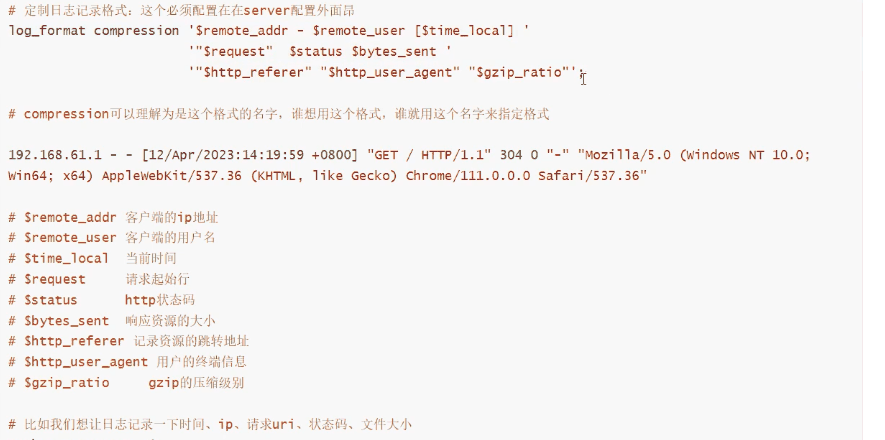
log_format compression '$remote_addr - $remote_user [$time_local] '
                     '"$request" $status $body_bytes_sent '
                     '"$http_referer" "$http_user_agent" "$gzip_ratio"';

access_log  logs/access.log  compression;
注意:
log_format必须写在http块里,写到server里-t直接报错。
9.basic 认证,给后台路径加把锁:
yum install -y httpd-tools

# -c 是创建,会覆盖已有的文件
htpasswd -c /root/nginx/basic/passwordfile your_username
然后在对应的 server 里加两行:
server {
    listen       80;
    server_name  test001.example.com;
    location / {
        auth_basic "test001.example.com";
        auth_basic_user_file /root/nginx/basic/passwordfile;
        root   /root/nginx/nginx/html;
        index  index.html index.htm;
    }
}
提示:加第二个用户时要去掉
-c,否则第一个用户被冲掉。auth_basic后面引号里的内容只是弹窗标题,随便写。
10.SSL 证书和强制跳 https:
server {
    listen 80;
    server_name test001.example.com;

    return 301 https://$host$request_uri;
}

server {
    listen 443 ssl;
    server_name  test001.example.com;
    ssl_certificate     /root/nginx/ssl/full_chain.pem;
    ssl_certificate_key /root/nginx/ssl/private.key;
    ssl_session_timeout 10m;
    ssl_ciphers 'EECDH+AESGCM:EDH+AESGCM:AES256+EECDH:AES256+EDH';
    ssl_protocols TLSv1.2 TLSv1.3;
    ssl_prefer_server_ciphers on;
    location / {
        proxy_pass http://10.0.0.5:50000;
        proxy_set_header Host $host;
        proxy_set_header X-Real-IP $remote_addr;
        proxy_set_header X-Forwarded-For $proxy_add_x_forwarded_for;
        proxy_set_header X-Forwarded-Proto $scheme;
    }
}
注意:
$host和$request_uri都要带。只写$host的话路径和查询参数全丢了。
💡 补充几个原文没写的:
Debian 系不用编译。
apt install nginx一条就完事,源码编译是兜底的路。CentOS 7 装不到新版本。 官方已停止维护,
yum里的版本停在 1.20 附近,要新的只能源码编译或者换 Rocky / AlmaLinux。worker_processes 一般配 CPU 核数。 用
ps -ef | grep nginx数一下实际起了几个。报 403 先查权限。 多半是 worker 没权限读目标目录,要么改用 root 跑,要么 chmod。
总连接数是乘出来的。 上限 = worker_processes × worker_connections,不是只看后一个。
🔥 一句话总结:编译时把 --with-http_ssl_module 带上,改完配置先 ./nginx -t 验语法,然后 reload 而不是 restart。